Senin, 12 April 2021

APEX_JSON.WRITE Tips

  • For null case

Use: APEX_JSON.write('P_INVOICE_TRACKING', '', true);

Result: "P_INVOICE_TRACKING":null 

  • For Escaping "& /" character 

Use: APEX_JSON.write_raw('P_INVOICE_NUMBER', '"'||r_header.sppd_code||'"');

Result: "P_INVOICE_NUMBER":"0134/XYZ/084/RS/2021" 

Kamis, 28 Januari 2021

How to get SOURCE SYSTEM OWNER list

 Here how to get SOURCE SYSTEM OWNER on HDL process

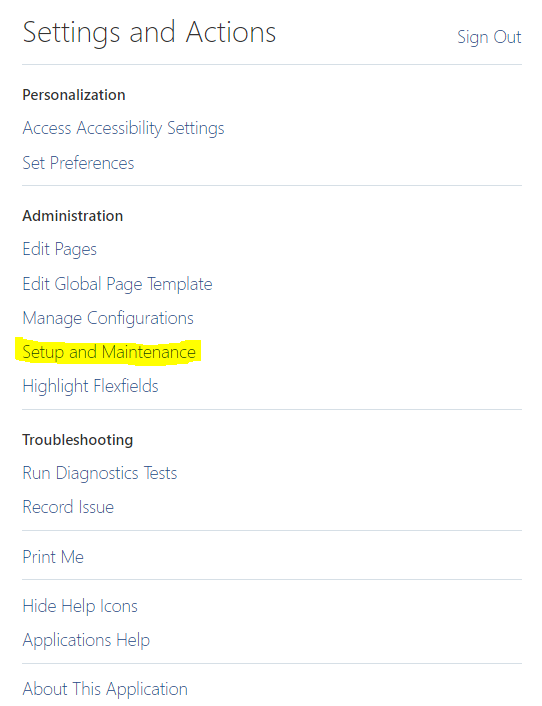
  1. Go to Setup and Maintenance

  2. Search "Manage Common Lookup"


  3. Search "HRC_SOURCE_SYSTEM_OWNER"


  4. By Query
  5. SELECT *
    FROM fnd_lookup_values
    WHERE lookup_type = 'HRC_SOURCE_SYSTEM_OWNER'


Rabu, 30 Januari 2019

Oracle APEX - Using Outlook 365 as outbound email


Here the steps to use SMTP Outlook 365 as email outbond from oracle APEX
  • Setup SMTP outlook 365 relay register your APEX host and get the smtp server name and port. how to to it check this youtube
  • Create oracle wallet on DBaaS/DB to *.outlook.com
  • Set Instance Setting > Email values on Workspace Internal

  • Test it using apex_email
  •   procedure send_email_test(
        p_from    varchar2 default 'info@yourdomain.com'
      , p_to      varchar2
      , p_subject varchar2 default 'Email test'
      )
      as
        l_body      clob;  
      begin
      
        l_body := 'Thank you for your interest in the APEX_MAIL package.'||utl_tcp.crlf;
        l_body := l_body ||'  Sincerely,'||utl_tcp.crlf;
        l_body := l_body ||'  The APEX Dev Team'||utl_tcp.crlf;
        apex_mail.send(
            p_to       => p_to,   -- change to your email address
            p_from     => p_from, -- change to a real senders email address
            p_body     => l_body,
            p_subj     => p_subject
        );
            APEX_MAIL.PUSH_QUEUE; 
      end send_email_test;


Thats it and good luck :D

Kamis, 30 Agustus 2018

Install/Upgrade Oracle APEX 18.1 on Oracle Database Cloud Service (DBaaS)

Assumption
  • You can connect to DBaaS through Putty and FileZilla
  • Oracle Database 12c Release 2 install on plugable db: PDB1
  • You have the required version of the cloud tooling
Steps
  1. Log in to the compute node as the oracle user.
  2. Log in to SQL Plus as the SYS user.
  3. Upload Oracle Application Express 18.1 to the compute node: /home/oracle/tmp
  4. Go to /home/oracle/tmp directory unzip to /u01/app/oracle/product/apex/18.1.0.00.45 directory:
  5. unzip apex_18.1_en.zip
    mv /home/oracle/tmp/apex/ /u01/app/oracle/product/apex/18.1.0.00.45/
    
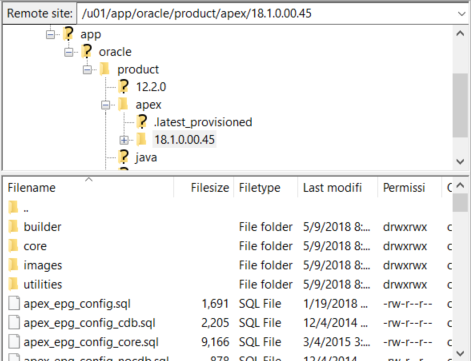
  6. Final directory preview
  7. Go to /u01/app/oracle/product/apex/18.1.0.00.45/ directory
  8. Make sure you can connect using ORDS_PUBLIC_USER, by default will have same password like sys,system on DBaaS creation.
  9. sqlplus /nolog 
    SQL> CONNECT ORDS_PUBLIC_USER 
    Password: 
    Connected. 
    SQL>
    
  10. Intall APEX 18.1
    • Log in to SQL Plus as the SYS user and install
    • ALTER SESSION SET CONTAINER=PDB1; 
      @dbcsins.sql SYSAUX SYSAUX TEMP /i/18.1.0.00.45/ <ORDS_PUBLIC_USER_PASSWORD> 
      
    • Check the installation went fine by issuing the following command (Using the same sqlplus session or at lease issuing the statement to the same container you installed APEX into)

    • SELECT VERSION, STATUS, SCHEMA FROM DBA_REGISTRY WHERE COMP_ID = 'APEX';
      
  11. Create a link to the APEX images in ORDS' docroot by executing the below command as the oracle user

  12. ln -sfn /u01/app/oracle/product/apex/18.1.0.00.45/images/ /u01/app/oracle/product/ords/conf/ords/standalone/doc_root/i/18.1.0.00.45 
    

  13. Configure Oracle Application Express by executing the Oracle REST Data Services (ORDS) assistant:

  14. Log in to the compute node as the opc user
  15. Start a root-user shell:
  16. $ sudo -s 
    
  17. Change to the ords directory:
  18. # cd /var/opt/oracle/ocde/assistants/ords
    
  19. Execute the ORDS assistant:
  20. # ./ords -out="/var/opt/oracle/ocde/res/ords.out" -ords_action="configure_apex"
    
  21. Restart ORDS:
  22. # /etc/init.d/ords restart
    
  23. Exit the root-user shell and log out of the compute node.
Reference

Senin, 24 Juli 2017

Implementing PDF.js on Oracle APEX

Here step by step preparation :


  • Install PDF.js under image prefix apex

  • Prepare Download page helper
    • Page with alias : DOWNLOAD_PDF
    • Process : before header
    • declare
        r_data EMP_PDF%rowtype;
      BEGIN
        select * into r_data
          from emp_pdf
         where empno = :P4_EMPNO;
          sys.htp.init;
          sys.owa_util.mime_header( r_data.mimetype, FALSE);
          sys.htp.p('Content-length: ' || sys.dbms_lob.getlength( r_data.pdf_data ));
          sys.htp.p('Content-Disposition: inline; filename='||r_data.filename );
          -- tell the browser to cache for one hour, adjust as necessary
          sys.htp.p('Cache-Control: max-age=3600');
          sys.owa_util.http_header_close;
          
          sys.wpg_docload.download_file(r_data.pdf_data);
          apex_application.stop_apex_engine;
      exception when others then
          sys.htp.prn('error: '||sqlerrm);
          apex_application.stop_apex_engine;
      END;
      
Case 1 : On form
  • Create Static Region

  • Preview

Case 2 : On Tabular form


Rabu, 29 Maret 2017

Query APEX Metadata out of APEX Context

For example you need to query on sql developer or execute apex_email from oracle job

example:
Select *
  from APEX_MAIL_QUEUE;

result : no row selected
Solution : Create procedure to mimic APEX context
create or replace procedure set_apex_context (
  p_app_id in number 
) as 
begin
 FOR c1 IN (
   SELECT workspace_id
    FROM apex_applications
   WHERE application_id = p_app_id
  )
 LOOP
   apex_util.set_security_group_id(p_security_group_id => c1.workspace_id);
 END LOOP;
end set_apex_context;

How to use :
before execute query run the procedure:
execute set_apex_context (140); --i40 is app id 
Select *
  from APEX_MAIL_QUEUE;

Selasa, 14 Juni 2016

APEX - Tomcat error : java.lang.OutOfMemoryError: Java heap space solution

Have you experienced the following error when using APEX-ords in Tomcat?
  • Environment : Tomcat 8 Windows 10
  • Symptom : java.lang.OutOfMemoryError: Java heap space when submit grid edit or array g_f02..g_fn
  • Solution : Change initial memory pool & maximum memory pool
After searching for solutions on the internet, many suggest arranging memory through catalina.bat or setenv.bat like Morten's suggestion. but Tomcat on windows cannot recognize the environment.

The solution you just need to run Tomcat8w.exe at %TOMCAT_HOME%bin, and configure the memory via the GUI and then restart Tomcat.