Rabu, 30 Januari 2019

Oracle APEX - Using Outlook 365 as outbound email


Here the steps to use SMTP Outlook 365 as email outbond from oracle APEX
  • Setup SMTP outlook 365 relay register your APEX host and get the smtp server name and port. how to to it check this youtube
  • Create oracle wallet on DBaaS/DB to *.outlook.com
  • Set Instance Setting > Email values on Workspace Internal

  • Test it using apex_email
  •   procedure send_email_test(
        p_from    varchar2 default 'info@yourdomain.com'
      , p_to      varchar2
      , p_subject varchar2 default 'Email test'
      )
      as
        l_body      clob;  
      begin
      
        l_body := 'Thank you for your interest in the APEX_MAIL package.'||utl_tcp.crlf;
        l_body := l_body ||'  Sincerely,'||utl_tcp.crlf;
        l_body := l_body ||'  The APEX Dev Team'||utl_tcp.crlf;
        apex_mail.send(
            p_to       => p_to,   -- change to your email address
            p_from     => p_from, -- change to a real senders email address
            p_body     => l_body,
            p_subj     => p_subject
        );
            APEX_MAIL.PUSH_QUEUE; 
      end send_email_test;


Thats it and good luck :D

Kamis, 30 Agustus 2018

Install/Upgrade Oracle APEX 18.1 on Oracle Database Cloud Service (DBaaS)

Assumption
  • You can connect to DBaaS through Putty and FileZilla
  • Oracle Database 12c Release 2 install on plugable db: PDB1
  • You have the required version of the cloud tooling
Steps
  1. Log in to the compute node as the oracle user.
  2. Log in to SQL Plus as the SYS user.
  3. Upload Oracle Application Express 18.1 to the compute node: /home/oracle/tmp
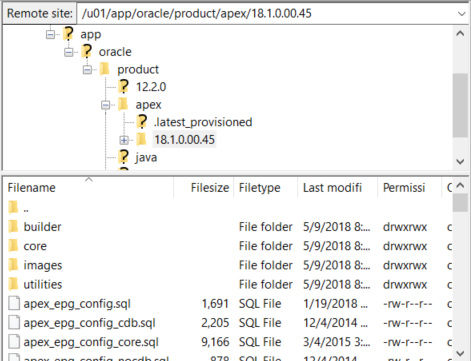
  4. Go to /home/oracle/tmp directory unzip to /u01/app/oracle/product/apex/18.1.0.00.45 directory:
  5. unzip apex_18.1_en.zip
    mv /home/oracle/tmp/apex/ /u01/app/oracle/product/apex/18.1.0.00.45/
    
  6. Final directory preview
  7. Go to /u01/app/oracle/product/apex/18.1.0.00.45/ directory
  8. Make sure you can connect using ORDS_PUBLIC_USER, by default will have same password like sys,system on DBaaS creation.
  9. sqlplus /nolog 
    SQL> CONNECT ORDS_PUBLIC_USER 
    Password: 
    Connected. 
    SQL>
    
  10. Intall APEX 18.1
    • Log in to SQL Plus as the SYS user and install
    • ALTER SESSION SET CONTAINER=PDB1; 
      @dbcsins.sql SYSAUX SYSAUX TEMP /i/18.1.0.00.45/ <ORDS_PUBLIC_USER_PASSWORD> 
      
    • Check the installation went fine by issuing the following command (Using the same sqlplus session or at lease issuing the statement to the same container you installed APEX into)

    • SELECT VERSION, STATUS, SCHEMA FROM DBA_REGISTRY WHERE COMP_ID = 'APEX';
      
  11. Create a link to the APEX images in ORDS' docroot by executing the below command as the oracle user

  12. ln -sfn /u01/app/oracle/product/apex/18.1.0.00.45/images/ /u01/app/oracle/product/ords/conf/ords/standalone/doc_root/i/18.1.0.00.45 
    

  13. Configure Oracle Application Express by executing the Oracle REST Data Services (ORDS) assistant:

  14. Log in to the compute node as the opc user
  15. Start a root-user shell:
  16. $ sudo -s 
    
  17. Change to the ords directory:
  18. # cd /var/opt/oracle/ocde/assistants/ords
    
  19. Execute the ORDS assistant:
  20. # ./ords -out="/var/opt/oracle/ocde/res/ords.out" -ords_action="configure_apex"
    
  21. Restart ORDS:
  22. # /etc/init.d/ords restart
    
  23. Exit the root-user shell and log out of the compute node.
Reference

Senin, 24 Juli 2017

Implementing PDF.js on Oracle APEX

Here step by step preparation :


  • Install PDF.js under image prefix apex

  • Prepare Download page helper
    • Page with alias : DOWNLOAD_PDF
    • Process : before header
    • declare
        r_data EMP_PDF%rowtype;
      BEGIN
        select * into r_data
          from emp_pdf
         where empno = :P4_EMPNO;
          sys.htp.init;
          sys.owa_util.mime_header( r_data.mimetype, FALSE);
          sys.htp.p('Content-length: ' || sys.dbms_lob.getlength( r_data.pdf_data ));
          sys.htp.p('Content-Disposition: inline; filename='||r_data.filename );
          -- tell the browser to cache for one hour, adjust as necessary
          sys.htp.p('Cache-Control: max-age=3600');
          sys.owa_util.http_header_close;
          
          sys.wpg_docload.download_file(r_data.pdf_data);
          apex_application.stop_apex_engine;
      exception when others then
          sys.htp.prn('error: '||sqlerrm);
          apex_application.stop_apex_engine;
      END;
      
Case 1 : On form
  • Create Static Region

  • Preview

Case 2 : On Tabular form


Rabu, 29 Maret 2017

Query APEX Metadata out of APEX Context

For example you need to query on sql developer or execute apex_email from oracle job

example:
Select *
  from APEX_MAIL_QUEUE;

result : no row selected
Solution : Create procedure to mimic APEX context
create or replace procedure set_apex_context (
  p_app_id in number 
) as 
begin
 FOR c1 IN (
   SELECT workspace_id
    FROM apex_applications
   WHERE application_id = p_app_id
  )
 LOOP
   apex_util.set_security_group_id(p_security_group_id => c1.workspace_id);
 END LOOP;
end set_apex_context;

How to use :
before execute query run the procedure:
execute set_apex_context (140); --i40 is app id 
Select *
  from APEX_MAIL_QUEUE;

Selasa, 14 Juni 2016

APEX - Tomcat error : java.lang.OutOfMemoryError: Java heap space solution

Have you experienced the following error when using APEX-ords in Tomcat?
  • Environment : Tomcat 8 Windows 10
  • Symptom : java.lang.OutOfMemoryError: Java heap space when submit grid edit or array g_f02..g_fn
  • Solution : Change initial memory pool & maximum memory pool
After searching for solutions on the internet, many suggest arranging memory through catalina.bat or setenv.bat like Morten's suggestion. but Tomcat on windows cannot recognize the environment.

The solution you just need to run Tomcat8w.exe at %TOMCAT_HOME%bin, and configure the memory via the GUI and then restart Tomcat.


Rabu, 18 Mei 2016

How to relocate datafile from one drive to other without shutdown db


  1. Login to SQL*Plus
  2. Connect as SYS DBA with CONNECT / AS SYSDBA command
  3. Make offline the affected tablespace
  4. ALTER TABLESPACE tablespace_name OFFLINE;
    
  5. Modify the name or location of datafiles in Oracle data dictionary using following command syntax:
  6. ALTER TABLESPACE tablespace_name
    RENAME DATAFILE 'fully qualified path to original data file name' 
    TO 'new or original fully qualified path to new or original data file name';
    
  7. Bring the tablespace online again
  8. ALTER TABLESPACE tablespace_name ONLINE;
    
  9. If you experienced this error : ORA-01113, execute this syntax:
  10. recover datafile 'new fully qualified path to original data file name'
    

source : otn

Kamis, 21 April 2016

Can You Build Application and Go Live in Six Months?

The answer is Yes we can, if:


  • We have the Operations Team with the concept of mature business processes and understand the systems approach when transform a manual process into the IT system.
  • You are an experienced developer and willing to adopt the best standards.
  • You have the end-user militant to jointly perform data entry and testing of applications, and then use it in everyday transactions.
  • Full support of the company's management.

  • I post this to share how to build an aplication with the concept of RAD (Rapid Application Develoment) can be achieved. Four factors I described above should be synergized to get there, if you are in the position of the second factor (as developers) usually have a tendency of less expensive non-technical factors, can be guaranteed not to be. As well as any best software you have if no synergy of all four of these factors it is not unattainable.

    Okay, to measure the success of an app I would narrow the parameters of what is called success :
    • Applications have Go Live and in use in everyday transactions replace existing manual processes
    • Maintaining business continuity between the actual processes and processes used in the IT application.
    Process & Team

    This is an example of a case when building an application "Tailor-Made" called IP-ICOFR CSA Online, I was fortunate enough to do so by a synergy of the four factors that I mentioned earlier.

    I would normally ask for a team that includes: business analyst, I as a developer and other components depending on the needs will be called "Operation Team". This team will become one entity, no longer act as lonely developer, despite the fact that I am the only developer :D, but to the unity of IT application system will be talking about all the problems and decided by this team.

    For myself, I do the following:
    • Provide enough time to build the Blue-print business process applications, with interview and fairly intensive discussion, do not rush to the design phase of the application until the blue-print is obtained.
    • To the business analyst I ask: "Do not let me do the assumptions of a process, give me certainty"
    • Do not always accept an idea without giving an alternative that is better if there is one. Because the business user perspective they should also be viewed and considered how it goes in the IT system.
    • Study the business processes in depth so that we will be able to predict how these applications will evolve in the future.
    • Mutual open to understanding ideas and receive feedback about how the system they will be built.
    From the Operation Team: Business Analyst side
    • Giving a good presentation to the management about: the staging, the process, the planned schedule, and asked for support for every phase of which will be run.
    • Understand that there are stages that will be achieved requires the process to be accommodated in a certain phase, it will not necessarily have to be adopted at that time.
    • All demand/request for features will be through team and filter based on: the need, and readiness phase. I relayed: "I just listen to one side, namely through Operation Team".
    • Always provide certainty of process, if still doubt be delayed until absolutely sure as to what it should be.
    Finally, with hard work and synergies of these four factors we succeeded in realizing a Go Live application within 6 months, which has been implemented into the entire units of PT. Indonesia Power
    • Kantor Pusat (Headquarters)
    • Unit Jasa Pemeliharaan
    • UJP Banten 1 Suralaya
    • UJP Banten 2 Labuan
    • UJP Banten 3 Lontar
    • UJP Banten 4 Cilegon
    • UJP Pelabuhan Ratu
    • UJP Adipala
    • UJP Pangkalan Susu
    • UPJP Priok
    • UP Suralaya
    • UP Saguling
    • UPJP Kamojang
    • UP Mrica
    • UP Semarang
    • UP Perak Grati
    • UPJP Bali
    Rundown Phase
    • 01 Nopember 2015 : Kick Off Project


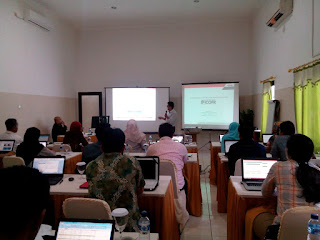
  • 27-29 Januari 2016 : Workshop/UAT (Operation Team Level) - Bandung
  • 17-19 Februari 2016 : Workshop/UAT (User Admin Level) - Semarang
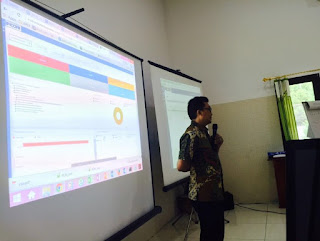
  • 11-15 April 2016 : Workshop/UAT (End User Level) - Bali
  • 21-23 April 2016 : Go Live (Indonesia Power's Annual Financial Forum 2016) – Jogjakarta


  • Technology
    • Oracle Application Express (APEX) 5.0.3.00.03 with ORDS Listener 3.0.2.294.08.40
    • Oracle Database Enterprise Edition Release 12.1.0.2.0 - 64bit (Linux Redhat)
    • Oracle WebLogic Server 12.2.1.0.0
    • Oracle BI Publisher 11.1.1.6.8

    Features
    • Flexible Setup : BPM & Hierachy Team
    • Multiplatform browser
    • Responsive Web Design
    • Email notification & Subscription
    • Interactive Reports
    • Multi format Report
    • Online Video tutorial

    ICOFR- Control Self Assesment References